

Five files. Five questions. A CLAUDE.md that ties them together. The setup works. Claude picks up where you left off, every session, for every project.
But you’re still the one holding it all together.
“Read the specs first.”
“Update status when we’re done.”
“Check the pipeline.”
“Commit the changes.”
Every time you add something new to the system (a new file, a new convention, a new check), that’s one more thing to remember to tell the LLM at the beginning of a session.1
The files hold the knowledge. But they don’t carry the session forward on their own.
That’s what skills are for.
Shortcuts
One thing that made a real difference early on, before models that code, was codifying instructions I found myself repeating. goodalexander called these “prompt macros.”2
One of the first ones I used: OPTIMIZE.
The problem it solves: you braindump a flurry of thoughts into a chat, knowing well the model would give you a much better response if your request were cleaner, more structured. But you don’t want to rewrite it. So instead, you prepend your prompt with “OPTIMIZE,” and the model restructures your prompt into something precise, then answers that.
But how does it know what OPTIMIZE means? You define it.
Here’s the definition, abridged from the one I actually use:
OPTIMIZE: Analyze the prompt that follows for ambiguities and missing context. Rewrite it as a detailed, actionable specification: add defaults, specify output format, include operational requirements. Then execute the refined version.
You save this somewhere the model can access it. Claude has personal preferences and project instructions; ChatGPT has custom instructions. Or just tell it in a chat: “remember this definition for OPTIMIZE.” Most LLMs now have memory that persists across conversations, even if it’s not always the most reliable.
If you have never tried a version of this, throw something messy at a chatbot and type OPTIMIZE before it.
Or try VARIANTS, to get structurally distinct alternatives instead of slight variations. And PUSHBACK, to force the model to disagree with you (an anti-sycophancy protocol). Ask your favourite model to help you define these macros, and to commit them to memory. Then use them.
I built a much larger set over time.3 And once you get the idea, you may have Claude itself suggest and create macros for how you work.
From macros to skills
Anthropic’s Thariq Shihipar put it neatly: “Using Skills well is a skill issue.” His concern is the craft of it — how to write ones that actually work.4

But the craft isn’t the bottleneck. There’s myriad freely available skills you can adopt and add to your system wholesale. The real skill issue is recognizing the repeated moves in your own workflow that deserve codification.
I find it useful to think of skills as shortcuts that Claude Code (or Codex) knows to read.
Claude Code has a dedicated place for them: a .claude/skills/ directory. Each skill is a markdown file. Not a plugin. Not a script. Just structured instructions in plain language that Claude follows when you type a slash command — /log, /end, /brainstorm.
.claude/
    skills/
        brainstorm/
            SKILL.md
        start/
            SKILL.md
        end/
            SKILL.md
The idea is the same as macros. PUSHBACK the macro became /pushback the skill. VARIANTS became /variants.
The instructions look similar. The reach is different. A skill can read your project files, check past decisions, produce structured output, update your specs. A macro can’t do any of that — it only shapes how the model responds within a single conversation.
If you wrote a macro, you can write a skill. Same thinking, different reach.
The first routine worth encoding
The first thing I wanted off my plate was session continuity.
That only works if someone reliably reads the right files at the start and updates them at the end. /start and /end turn that from a repeated instruction into a routine.
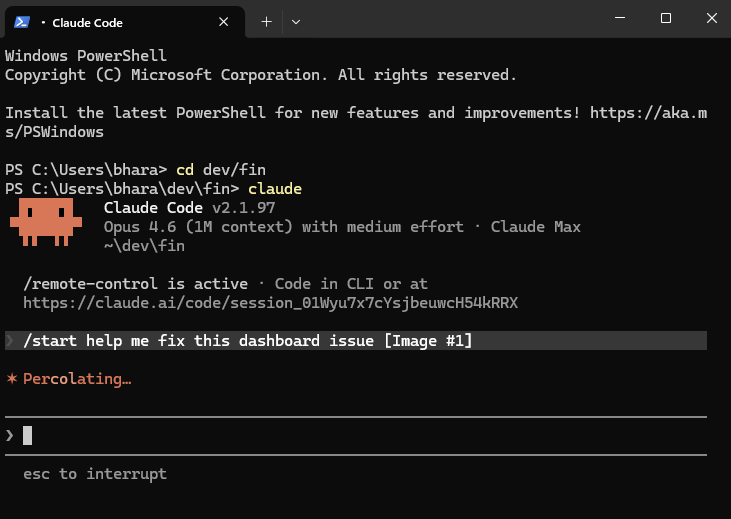
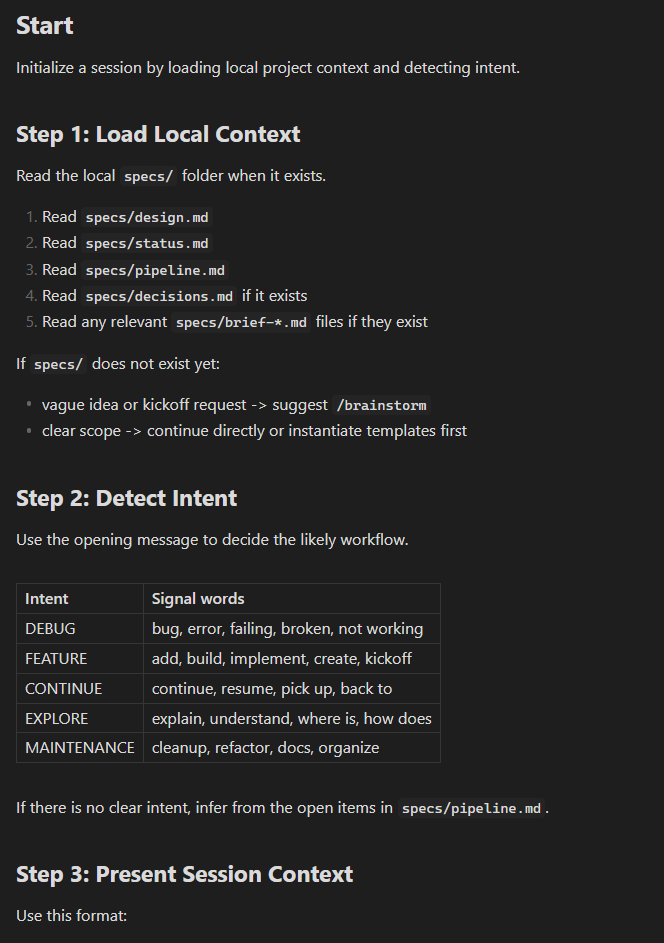
/start reads your spec files, detects what you’re here to do from your opening message, and surfaces relevant context.
/end updates status.md and pipeline.md so the next session doesn’t begin cold.
Now you know what’s inside: a markdown file in .claude/skills/ that Claude reads when you type the name. The routine you used to perform manually, encoded once, done.
That alone is useful. But /start and /end are automation — they handle what you’d do anyway, just reliably.
Some skills change the work itself.
Before the first line of code
Two Files described how I begin projects by asking Claude to grill me on what I intend to build, saving the results of that discussion as design.md.
Over time this grew into a structured interview template.5 Here’s what it looks like:
The Idea — What are you building? What triggered this? Walk me through using it step by step.
Context Check — Does this overlap with something you already have? Who uses it? Where does it fit?
Scope Boundaries — What’s the minimum version that’s useful? What are you explicitly not building?
/pushbackon “it should also...”Technical Constraints — What does it integrate with? Any hard limitations?
Success Criteria — How will you know it’s done enough to use?
Synthesis — Reflect back, surface tensions, propose boundaries, draft the spec files.
You can use this today. Paste it into any LLM and run the interview yourself. You’ll get a better design.md than if you’d just said “help me plan my project.”
I folded this template into a skill called /brainstorm.6 Now I type one word and Claude runs the full interview — checks my existing projects for overlaps, grills me on scope, pushes back when I’m cramming two features into one, and produces a design.md at the end.
Same template. One word.
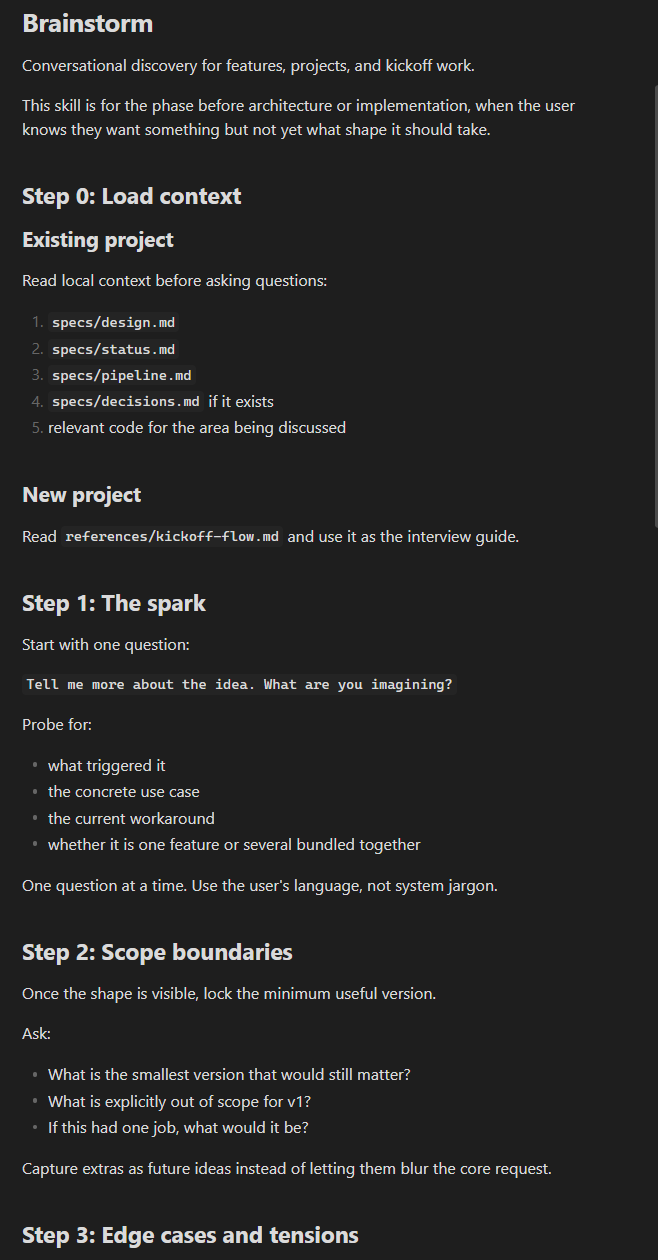
And it works for more than kickoffs. Mid-project, when I’m thinking about a new feature, /brainstorm runs the same interview adapted to what already exists. It reads the codebase, assesses impact, tells me if the feature is more invasive than I think.
The wider pattern
/brainstorm is one skill that shapes the work. There are others.
/architect turns a brief into a design document with architecture decisions and tradeoffs. /review audits code for quality and security before I ship. /variants generates structurally distinct alternatives when I’m stuck between approaches. /pushback forces Claude to find flaws in a plan before I commit to it.
The one I find myself reaching for most lately is /study — a structured way to absorb what everyone else is building and fold the patterns into my own system. That one deserves its own post.
Encode the move once. Stop restating it every session.
This only grows. Once you start tracking decisions, managing a pipeline, committing code, syncing backups, the end-of-session checklist gets long. Forgetting one item (updating pipeline but not status, or committing but not syncing) means the next session starts with stale context. This is exactly the kind of routine that should be automated.
goodalexander’s 11 AI Prompting Heuristics were the seed for much of this thinking. His “Disagreeable Model” heuristic became my PUSHBACK macro, which became the /pushback skill.
I’m publishing a small starter set in dev-setup, with one file per macro: optimize.md, steps.md, variants.md, pushback.md, and snapshot.md. The internal set is larger.
Anthropic’s team has written about building skills at scale. Thariq’s lessons from hundreds of production skills describes categories, progressive disclosure patterns, and the principle that good skills give goals, not step-by-step procedures. Anthropic’s official skills guide covers the mechanics.
The template is available in the starter set at .claude/skills/brainstorm/references/kickoff-flow.md.
The public version of this flow is packaged in the dev-setup repo I shared above: trimmed versions of /start, /end, and /brainstorm, among other things.