

If you followed the last post and you’re building something real, you have a specs folder with two files.
design.md — what you’re building.status.md — where you are right now.
You tell Claude to read them at the start of each session. It picks up where you left off. It works.
Until it doesn’t.
A couple of days into building fin, status.md had become a dumping ground. Feature ideas. Bugs I’d noticed. Half-formed thoughts about how subscriptions should work. Things I was dreaming up mixed in with things that actually existed.
Status was supposed to be what is. Now half of it was “what is” and half “what if.” And the more threads I opened in a single session, the messier Claude’s responses got. Not necessarily wrong. Just less focused. Less useful.
Here’s what I noticed: better organize what the model reads, and what it does becomes markedly more predictable. This idea is called separation of concerns.
Each file should answer exactly one question.
When a file starts answering two questions, split it.
pipeline.md — “What’s next?”
The first concern worth separating: your developmental queue.
Feature ideas. Deferred work. Bugs you noticed but don’t want to fix right now. Things that aren’t the current state of the project — they’re the future state. They don’t belong in status.
pipeline.md separates what’s next from what exists.
specs/
    design.md      ← what are we building?
    status.md      ← where are we right now?
    pipeline.md    ← what’s next?
It doesn’t need to be fancy. A list works:
“Dashboard chart overhaul — start with multi-select.”
“Subscription alerts — not enough pain yet, revisit later.”
Tell Claude to read it alongside your other spec files at the the start of a session, and to “add this to the pipeline” or “queue this up” mid-session. It knows your priorities without your explaining them. It’ll slot it in and prioritize the list for you.1
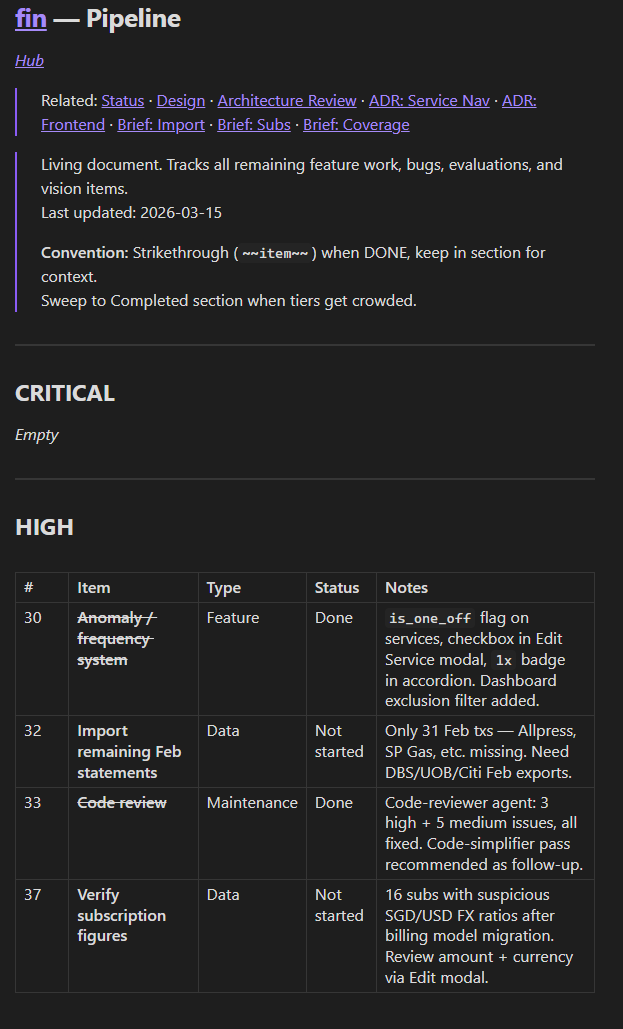
Status then goes back to doing one thing: the current state — what exists right now and what happened in your most recent sessions.
decisions.md — “Why this and not that?”
Some decisions are obvious from the code. You used Flask, not FastAPI. Anyone can see that.
But some decisions are invisible. The reasoning lived in a conversation, and when that conversation is gone, so is the reasoning.
I wanted my subscriptions in fin — Netflix, Spotify, ChatGPT — linked to actual bank transactions. Not static rows. Live data: when did I last pay, how much.
Claude and I worked through several matching approaches. We picked one. It worked.
A few days later, new session. Claude suggests a completely different approach — one we’d already considered and rejected.
decisions.md is where that reasoning lives. A running log of choices that were contentious or consequential — the ones where you weighed alternatives and chose for reasons that aren’t obvious from the code.
Not every choice. Just the ones where forgetting would cause confusion. The test: would Claude relitigate this if it didn’t know?
Over time, decisions.md becomes a developmental journal. You can trace the evolution of your project through the choices you made and why.
Status tracks session-by-session progress. Decisions tracks how the shape emerged. Design still holds the original vision — and the gap between design and reality is also telling.
If you’re building with someone else, decisions is even more valuable; a new collaborator can read the rationale without asking you to re-explain every choice.2
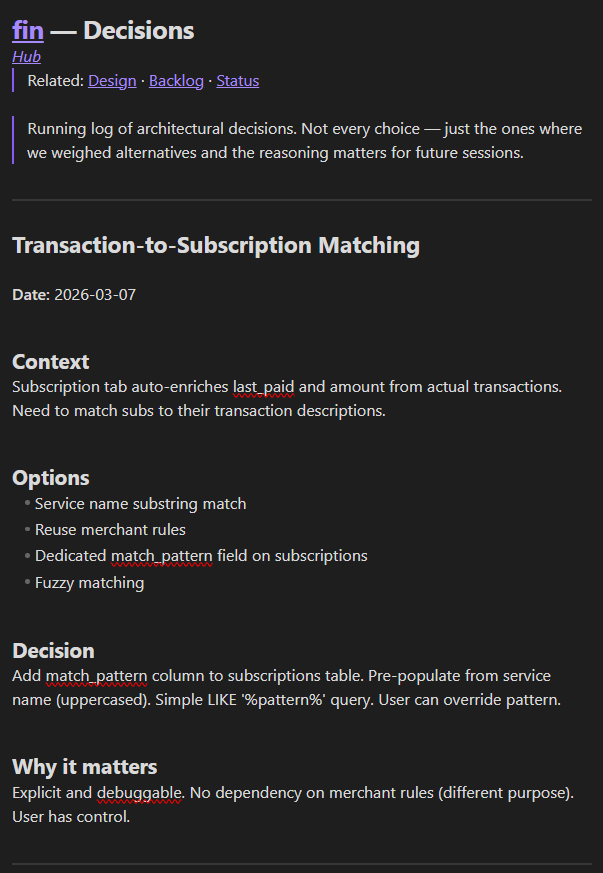
The format is simple — you can use mine or ask Claude to suggest a structure that works for you:
Context — why this decision came up
Options — what you considered
Decision — what you chose
Why it matters — what a future session needs to know
specs/
    design.md      ← what are we building?
    status.md      ← where are we right now?
    pipeline.md    ← what’s next?
    decisions.md   ← why this and not that?
Four files. Each answering one question.
CLAUDE.md — “How does this all work?”
You now have four spec files. But Claude doesn’t automatically know they exist. Every session, you’d need to say: “Read the specs folder. There’s a pipeline file now. And a decisions file.”
CLAUDE.md is a markdown file at your project root that Claude Code reads automatically at the start of every session.3 You don’t ask. It just does. Anthropic calls it a project constitution — a persistent set of instructions the model loads before you say a word.4
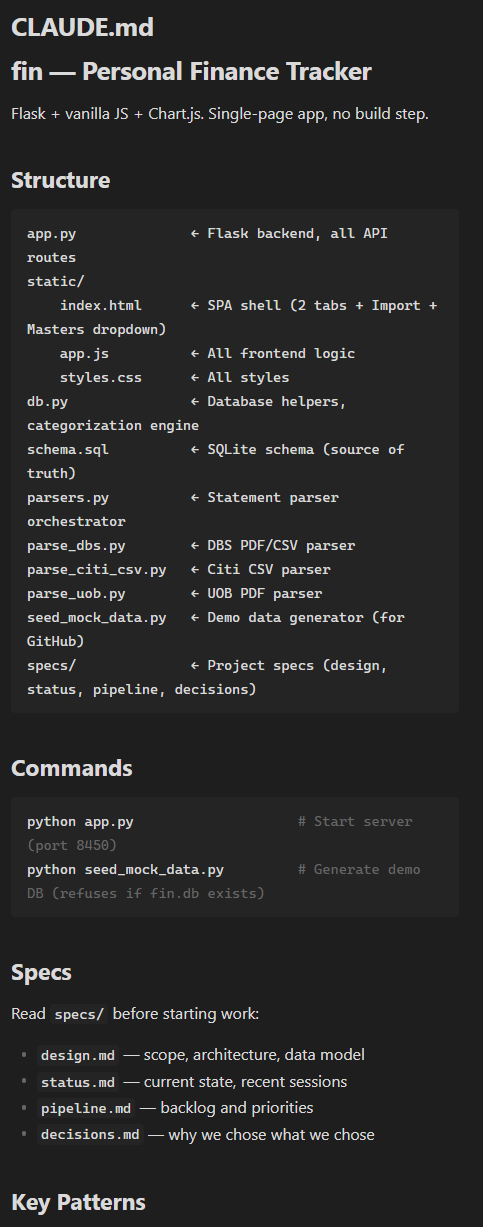
It’s where you describe your project’s layout: what lives where. The spec files you just created? CLAUDE.md is how Claude knows they exist.
It tells Claude:
What this project is (one line)
Where to find context (your specs folder)
How to run the project (commands it can’t guess)
What to avoid (constraints that would waste time)
Tell Claude to write it once. You revise it when the project’s structure changes.5
my-project/
    CLAUDE.md          ← how does this all work?
    specs/
        design.md      ← what are we building?
        status.md      ← where are we right now?
        pipeline.md    ← what’s next?
        decisions.md   ← why this and not that?
Five files. Five questions. One system.
Encoding the ritual(s)
If you’re using these files, pretty soon you’ll find yourself tired of telling Claude to read design, status, pipeline, decisions before every session, and to update them at the end. This is where skills come in.
Claude Code lets you create reusable procedures you trigger with a slash command.6 I start every session by typing /sessionstart. I end with /sessionend. That’s it — my shorthand for Claude to read the specs, surface what’s relevant, and update everything when we’re done.
CLAUDE.md gives Claude the map. Skills give Claude the routine. I’ll go over skills in much more detail in subsequent posts.
A caveat
Naval Ravikant recently said something worth sitting with:7
“The only reason to use these workflows and tool sets, which are very ephemeral, and their longevity is measured in weeks, perhaps months at best, not in years, is if you’re at the bleeding edge and absolutely need every advantage.”
His strongest version: AI will adapt to you faster than you can adapt to it. The tools will absorb the best practices. Why build infrastructure that’ll be outmoded?
He’s not wrong about the tools. Claude Code will evolve. Skills might work differently next quarter, or next week. Some of this may become built-in.
But the act of structuring your process teaches you things about your own work that no tool can hand you. What belongs in status vs. pipeline? Which decisions are worth recording? Where does complexity actually live in your project? These aren’t questions a tool answers for you. They’re questions you answer by building the system — and the answers make you better at the work itself.
The files aren’t just for Claude. They’re for you.
What are we building?
Where are we right now?
What’s next?
Why this and not that?
How does this all work?
Five questions. Five files. Markdown. They’ll likely outlast whatever tool you’re using today.
Give it structure. The rest will follow.
You can ask Claude to reorder your pipeline by priority anytime. It’ll present a proposed order for you to approve; you stay in control, but the sorting is handled.
Ashpreet Bedi uses a similar pattern: architecture decision records (ADRs) that track context, options, and consequences. His full system is worth reading if you’re building at larger scale.
CLAUDE.md is a first-party Claude Code feature. Anthropic’s docs recommend keeping it under 200 lines, focused on things the model can’t figure out by reading the code.
You don’t need a template to draft this. Ask Claude: “Read my project and help me write a CLAUDE.md — include the commands you can’t guess, the patterns that aren’t obvious from the code, and anything I’d have to re-explain every session.” It’ll generate something reasonable. Refine from there.
This is where tools like Claude Code diverge from browser-based chat. On the web, every conversation starts blank — there’s no way to persist instructions across sessions besides “project instructions.” Claude Code runs over your actual project files, and CLAUDE.md takes advantage of that. Other tools have equivalents: OpenAI’s Codex has AGENTS.md, Cursor has rules files. The concept is converging across every major tool.
Skills are markdown files in .claude/skills/ that Claude loads on demand. Anthropic’s docs on skills. I think of them as procedures or routines that one routinely invokes.
Naval Ravikant’s “On Artificial Intelligence” makes a strong case for letting AI adapt to you rather than the other way around. I think he’s right about the tools and wrong about the discipline.