


Naval has a habit of naming what everyone’s already feeling. If you’re curious about building with AI — or you’ve already started and every session feels like starting from scratch — here’s how I’d do it if I were starting all over again.
Start with a real problem. Not a tutorial. Not a to-do app from a YouTube video. Something you actually need — a tracker, a dashboard, a tool for your business. The motivation matters. It’s what keeps you going when the AI gives you garbage on the third try. I built fin because I had zero handle on where my money was going each month. I built Scholia because I didn’t want to pay Remnote for AI credits when I could pay the frontier labs directly, ha!
Getting set up
You need two things: Claude Code and a terminal.
I know. The terminal. A Command Line Interface (CLI). That black window with text that looks like it’s from 1993. But here’s the thing — once you go terminal, you don’t go back. It’s where the real power is, and it’s how I build everything you’ll see on this Substack.
If a terminal truly isn’t for you, use Claude Desktop (Cowork) instead — same AI, visual interface, works fine. I hear Codex isn't terrible either.
But try the terminal first. On Windows, it’s called PowerShell. On Mac, it’s Terminal. If you’ve never installed a CLI tool before, ask any LLM you already use to walk you through it.1
Once Claude Code is installed:
Make yourself a home base. Open File Explorer (Windows) or Finder (Mac), and create a folder where all your projects will live. I call mine dev. Everything I build goes here — one subfolder per project.
Inside dev, create a folder for your first project. Give it a name. I have one for each thing I build:
dev/
    fin/
    scholia/
    moom/
Each project gets its own folder. Don’t dump everything into one place. When you start something new, make a new folder.
Now open your terminal, navigate to your project folder, and start Claude.2
cd dev/fin
claude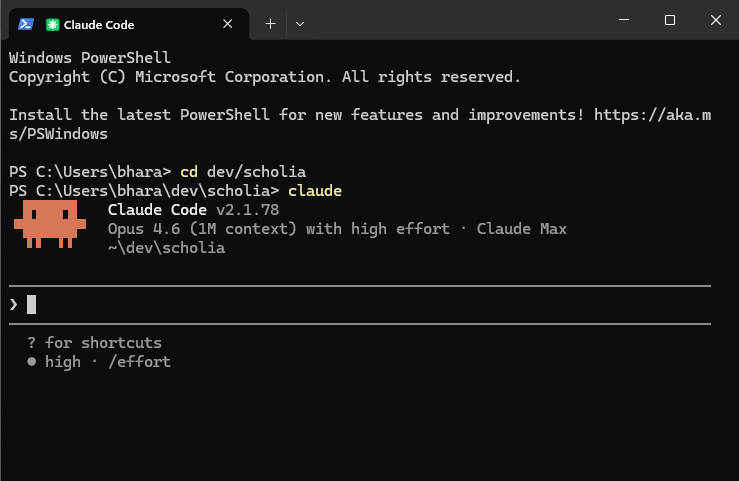
That’s it. You’re in.
You’re now armed with the two things you need to vibe code: an idea and a coding agent.
Everything you build, every file you create, lives in the directory you just created.
The first thing to do
Before Claude writes a line of code for you, ask it to help you think through what you’re building.
Not vaguely. Have it grill you. What’s the problem? Who’s it for? What’s the scope? What are you not building? Let it push back. Let it ask the questions you haven’t thought of yet.3
Then ask it to save that conversation as design.md in a folder called specs/.
my-project/
    specs/
        design.md
You now have a design document. You didn’t write it. Claude did, from your answers.
Here’s what mine looks like for fin:
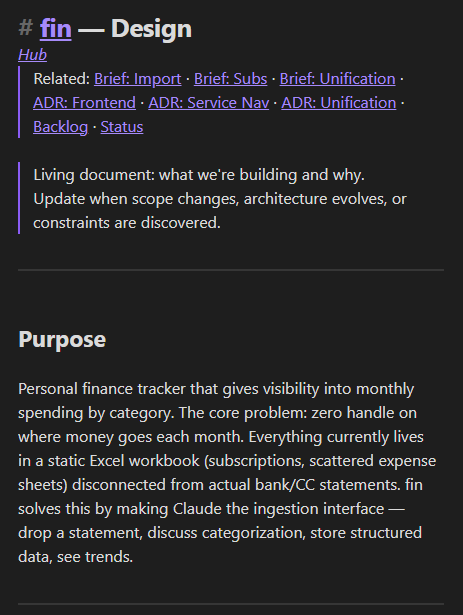
That’s the whole purpose, scope, and architecture — written by Claude after a 10-minute conversation where it asked me what I needed and I answered honestly.
The second file
After your first real working session — an hour, two hours, whenever you want to stop — ask Claude to write a status update. What happened. What’s working. What’s broken. What you should pick up next time.
Ask it to save it as status.md.
my-project/
    specs/
        design.md
        status.md
Here’s a real one from fin:
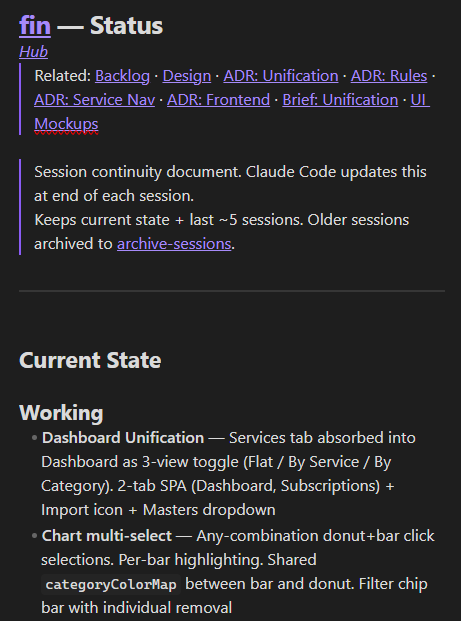
Next time you open Claude on this project, tell it to read specs/. It knows what you’re building. It knows where you left off. Zero re-explanation.
A third file?
I didn’t start with three files. I started with two.
pipeline.md — a backlog of what’s next — showed up later, when my projects got big enough that I couldn’t keep track of what to build next in my head.
If you’re building something small, two files is enough. The system grows with you.4 Don’t over-engineer it on day one.
Why markdown
Why not Notion? Why not a database? Why not some fancy tool?
Markdown because:
The AI reads it natively. No parsing, no API, no export step. It’s just text.
You can read it in any editor. VS Code, Obsidian, Notepad, your phone. No account required.
It lives in your project directory. Right next to your code. Versioned with git if you’re using it.
No dependencies. No accounts, no subscriptions, no setup. Create a file, start typing.
A note on context windows
The amount of information an LLM can hold in a single conversation
Context windows started at around 4,000 tokens (roughly 3,000 words). They’re now at 1 million tokens on the highest tiers. That’s an entire codebase (or the Lord of the Rings trilogy) in memory.
Bigger context windows are genuinely useful. They can hold more. But what to hold — that’s still on you. A million tokens of raw conversation is noise. The model can hold a ton of information, but it can’t tell what matters unless you’ve told it.
That’s what the spec files do. They’re not a workaround for small context windows. They’re the signal inside the noise. The problem was never memory capacity. It’s memory structure.
Closing thoughts
After a week of updating status.md, you have a development journal you didn’t intend to write.
After a month, you have a searchable history of every decision, every blocker, every pivot — across every project.
You didn’t plan this. It just happens when you give your process a place to accumulate.
You’ll also notice you’re repeating yourself: “Claude, read the specs” at the start, “Claude, update status” at the end. There’s a way to automate that. Next post.
This works with Claude Code, Cowork, Cursor, Codex — anywhere you can point an LLM at files in a folder. The tool doesn’t matter. The structure does.
Happy building!
Open Claude, ChatGPT, whatever you have and ask “how do I install Claude Code on my Windows laptop” (or Mac, or whatever you’re on). Follow what it tells you. The setup instructions are one of the things AI is genuinely good at.
When you run claude from a directory, Claude Code operates within that folder — it can read, create, and edit files there. This is how it knows what project you’re working on. Different folder = different project = different context.
I’ve since turned this into a proper kickoff process — a structured interview that produces a design document, architecture decisions, and a project roadmap in one conversation. That’s for a later post. For now, just have the conversation.
Inspired by Ashpreet Bedi’s post on spec-first development — he uses a specs/ folder with design docs, implementation tracking, and decision records for AI coding agents. I adapted it: simpler, fewer files, focused on session continuity. His post is worth reading.